Discontinued
mfcj6530dw
mfcj6530dw
inkjet-printers
mfcj6530dw_us_eu_as
10
allinones
MFCJ6530DW
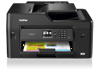
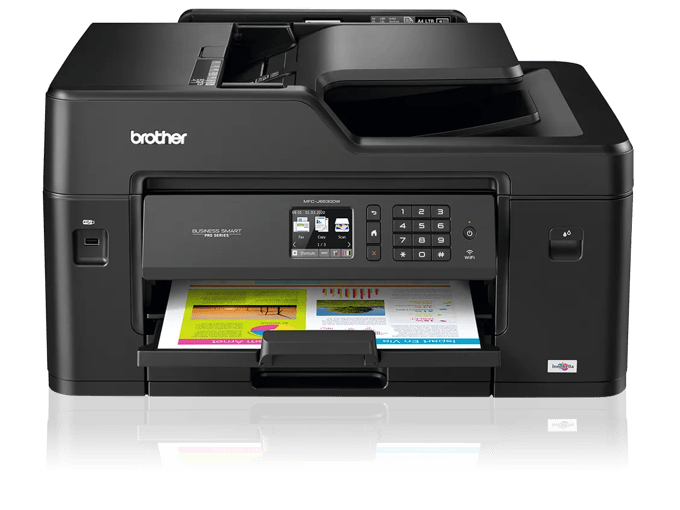
Brother MFC-J6530DW Business Smart™ Color Inkjet All-in-One Printer
$279.99
Two-year limited warranty.
Print copy scan and fax up to 11”x17”.
250-sheet paper tray accepts up to 11”x17”.
Print, copy, scan, fax up to 11"x17". Small business and workgroup-focused features include flexible paper handling capabilities, automatic two-sided printing, wireless and mobile device connectivity‡, and Super High-yield ink cartridges‡. Two-year limited warranty and free support for the life of your printer.
Feature | Value |
|---|---|
| Carton Contents‡ | LC3017 Black, Cyan, Magenta, Yellow High Yield Ink Cartridges CD-ROM – Assembly for Windows and Mac User's Manual Quick Setup Guide Telephone Line Cord |
| Warranty | 1 Year Limited |
Main Features
Print, Copy, Scan, Fax up to 11"x17".
Ledger-size scan glass and up to 50-sheet ADF‡. Automatic duplex (2-sided) printing.
250-sheet paper tray capacity.
Accepts up to 11"x17". Single sheet bypass tray for printing on envelopes and card stock for added convenience.
Built for business performance.
Spend less time waiting on printouts for when you need your documents fast.
Super High Yield Brother Genuine replacement ink cartridges.
Super High Yield cartridges offer additional page yields while helping to lower printing costs‡.
Connect your way.
Print from and scan to smartphones, tablets, laptops, and desktop computers‡.
Break free and go wireless.
Enjoy the freedom of wireless connectivity‡ and Wi-Fi Direct®.
Specifications
Detailed technical specs to help you understand performance, compatibility, and requirements.
Feature | Value |
|---|---|
| Standard Interface | Hi-Speed USB 2.0, Wireless 802.11 b/g/n, Ethernet, Wi Fi Direct |
| Standard Network Features‡ | Printing, Scanning, Removable Drive, PC Fax Send/Receive, Scan to E-mail Server (download), I-Fax (download) |
| Mobile Device Compatibility‡ | AirPrint, GoogleCloudPrint, BrotheriPrintandScan, WiFiDirect, Mopria |
| Brother Cloud Apps‡ | scantooffice, OfficePrint, Easy Scan to E-mail, Scan to Mobile, Scan to Searchable PDF, OutlineCopy, Notescan, CreativeCenter, Fax Forward to Cloud / Email |
| Supported Network Protocols IPv4 | ARP, RARP, BOOTP, DHCP, APIPA (Auto IP), WINS/NetBIOS Name Resolution, DNS Resolver, mDNS, LLMNR Responder, LPR/LPD, Custom Raw Port/Port 9100, IPP, FTP Client and Server, SNMPv1/v2c, TFTP Server, SMTP Client, ICMP, Web Services (Print/Scan), CIFS Client, SNTP Client, POP3, IMAP4, HTTP Server |
| Supported Network Protocols IPv6 | NDP, RA, mDNS, LLMNR Responder, DNS Resolver, LPR/LPD, Custom Raw Port/Port 9100, IPP, FTP Client and Server, SNMPv1/v2c, TFTP Server, Web Services (Print/Scan), SMTP Client, POP3, CIFS Client, SNTP Client, IMAP4, ICMPv6, HTTP Server |
| One Push Wireless Setup | Wi-Fi Protected Setup™ |
| WiFi Certified | Yes |
| System Requirement | Download System Requirement |
Feature | Value |
|---|---|
| Unit Weight | 42.8 |
| Unit Dimensions | 22.6" x 18.8" x 12.0" |
| Carton Dimensions | 23" x 27" x 18" |
Feature | Value |
|---|---|
| Standard Memory | 128 |
| Maximum Monthly Duty Cycle‡ | Up to 30,000 pages |
| Recommended Monthly Print Volume‡ | Up to 2,000 pages |
| Ink Save Mode | Yes |
| Toner Save Mode | No |
| Standard Paper Capacity | 250 |
Feature | Value |
|---|---|
| Automatic Document Feeder Capacity‡ | 50 |
| Standard Paper Input Capacity (sheets)‡ | 250 |
| Output Paper Capacity (Sheets)‡ | 100 |
| Duplex Printing Capability | Yes |
| Manual Feed Capacity‡ | 1 |
| Paper Handling Size Paper Tray | Letter, Legal, Ledger, Executive, A3, A4, A5, A6, Envelope (Com-10), Envelope (DL), Envelope (Monarch), Photo (3.5" x 5"), Photo (4" x 6"), Photo (5" x 7"), Photo (5" x 8") |
| Recommended Paper Brands | Brother Ledger Plain Inkjet Paper (BPPLGR), Innobella Ledger Glossy Paper (BP71GLGR), Innobella Glossy 8.5"x11" Photo Paper (BP71GLTR), Innobella Glossy 4"x6" Photo Paper (BP71GP20) |
Feature | Value |
|---|---|
| Machine Noise Ready Copying | Approx. 50dB |
| ENERGY STAR Certified | Yes |
| Operating Environment Humidity | 20-80% (w/out condensation) |
| Operating Environment Temperature | 50-95° F |
Feature | Value |
|---|---|
| Automatic Duplex Printing | Yes |
| Print Resolution | 4800 x 1200 dpi |
| Cloud Services‡ (Print) | Box/Box for Business, OneNote, SharePoint Online, Google Drive™/Google Drive for Business, Evernote®/Evernote Business, OneDrive/OneDrive for Business, Dropbox/Dropbox for Business |
| Consumable Type | Ink Cartridge |
| Printer Driver Compatibility‡ | Windows, macOS® |
Feature | Value |
|---|---|
| Scan File Formats | JPEG (JPG), PDF Single-page/Multi-page (PDF/A, High Compression PDF, TIFF Single-page/Multi-page (TIF) |
| Included Software‡ | ScansoftPaperPortSE, Presto!® PageManager® with OCR for Mac® |
| Scanning Capability | B/W and Color |
Feature | Value |
|---|---|
| Sorting Function | Yes |
| Standalone Copying | Yes |
| Design Style | Flatbed |
| ID Copy | Yes |
| N-in-1 Functions | 2in1 / 4in1 |
| Poster Function | Yes |
| Reduction Enlargement | 25%-400% |
| Copy Capability | BW;Color |
Feature | Value |
|---|---|
| Security Functions | Secure Function Lock |
| Wireless Network Security‡ | SSID (32 chr), WEP 64/128 bit, WPA/PSK (TKIP/AES), WPA2-PSK (AES) |
Feature | Value |
|---|---|
| Carton Contents‡ | LC3017 Black, Cyan, Magenta, Yellow High Yield Ink Cartridges CD-ROM – Assembly for Windows and Mac User's Manual Quick Setup Guide Telephone Line Cord |
| Warranty | 1 Year Limited |
| "In-box" Consumables/Yield‡ | Actual yield of starter cartridge will be approx. 65% of replacement LC3017 series, due to ink system initialization process. Approximate page yield in accordance with ISO/IEC 24711. For more page yield information, see www.brother.com/pageyield. |
| Automatic Document Feeder Capacity (max. pages)‡ | Up to 30-sheet sort copy. |
| Best Transmission Speed (approx. sec./page)‡ | Based on ITU-T test chart with highest available coding method and standard resolution. |
| Borderless Printing | Borderless printing is available for Letter, 3.5" x 5", 4"x6", 5"x8", 5"x7",A4, A6 paper sizes. Borderless not available with duplex printing. Minimum default margins when not printing borderless is 0.12 inches. |
| Broadcasting (# of locations) | B&W only. |
| Brother Cloud Apps‡ | Requires an Internet connection. |
| High-Yield Replacement Supply Available | Based on MSRP of individual LC3019 black and color ink cartridges and approximate page yield in accordance with ISO/IEC 24711. Additional purchase required. For more page yield information, see www.brother.com/pageyield. |
| Fax Page Memory (max. pages)‡ | Using ITU-T Test Chart #1 at standard resolution and highest compression mode. |
| Cloud Services (Web Connect)‡ | Requires an Internet connection and an account with desired service. All referenced trademarks and registered trademarks are the property of their respective companies. ©2018 Google LLC All rights reserved. Google Drive is a trademark of Google LLC. EVERNOTE is a trademark of Evernote Corporation and used under a license. |
| Call Waiting/ Caller ID/ Distinctive Ring Ready‡ | Check with local phone company for service availability. |
| ISO-based Copy Speed (black)‡ | Copy speed using ADF. Based on ISO/IEC 24735. For inkjet copy speed methodology, please visit https://www.brother-usa.com/-/media/files/PPM_page_L2.ashx. |
| ISO-based Copy Speed (color)‡ | Copy speed using ADF. Based on ISO/IEC 24735. For inkjet copy speed methodology, please visit https://www.brother-usa.com/-/media/files/PPM_page_L2.ashx. |
| ISO-based Print Speed (black)‡ | Based on ISO/IEC 24734 (after first set of ISO test pages). For inkjet print speed methodology, please visit https://www.brother-usa.com/-/media/files/PPM_page_L2.ashx. |
| ISO-based Print Speed (color)‡ | Based on ISO/IEC 24734 (after first set of ISO test pages). For inkjet print speed methodology, please visit https://www.brother-usa.com/-/media/files/PPM_page_L2.ashx. |
| Maximum Monthly Duty Cycle‡ | Maximum number of printed pages per month and can be used to compare designed durability between like Brother products. For maximum printer life, it is best to choose a printer with a duty cycle that far exceeds your print requirements. |
| Mobile Device Compatibility‡ | Requires connection to a wireless network. |
| Mobile Device Scanning App‡ | Requires connection to a wireless network. |
| Print Resolution (max. dpi) | Resolutions are listed vertical by horizontal dpi. |
| Recommended Monthly Print Volume‡ | The recommended range of monthly printed pages to achieve the best possible performance and printer life. Printers are intended to handle occasional usage beyond this range with little or no effect. Consistently printing above the recommended print volume, however, may adversely affect the print quality or life of the machine. It is always best to choose a printer with an appropriate recommended print volume to allow for any anticipated increase in printing needs. |
| Standard Input Paper Capacity (sheets)‡ | Maximum capacity based on using 20 lb (bond) paper. |
| Warranty | Click here for 2-Year Limited Warranty statement. |