Discontinued
mfcj875dw
mfcj875dw
inkjet-printers
mfcj875dw_us
10
allinones
MFCJ875DW
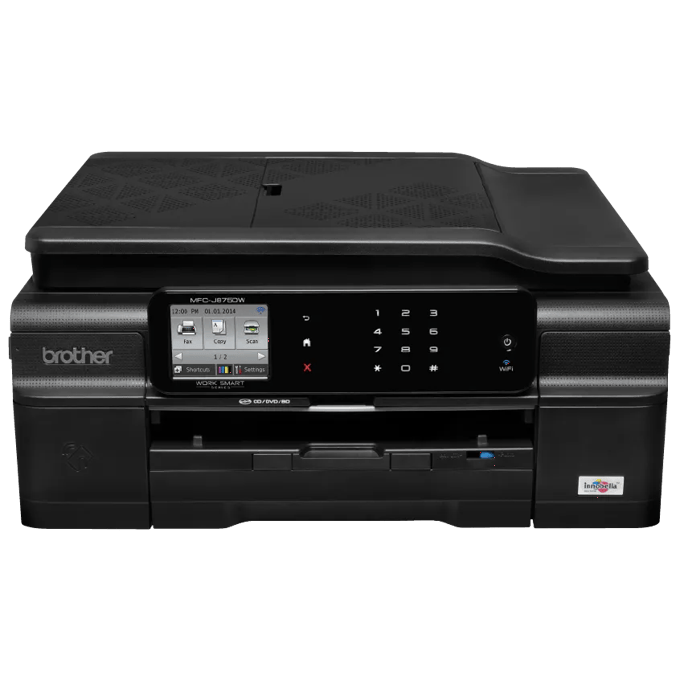
Brother MFC-J875DW Compact Color Inkjet All-in-One Printer
Color Inkjet All-in-One for your Home or Home Office If you're looking for an easy-to-use, economical color inkjet all-in-one that won't waste valuable workspace, the Brother™ Work Smart™ Series MFC-J875DW may be exactly what you need. In addition to its budget-friendly purchase price, it offers a lower total cost of operation thanks to high-yield replacement ink cartridges‡ and paper-saving duplex printing. Features like the intuitive 2.7" TouchScreen Display with Touch Panel, an automatic document feeder, printing and scanning from your NFC capable device‡, and free Brother Cloud Apps‡ make this all-in-one an excellent choice for your home/home office.
Main Features
Fast Color Printing on Demand.
Fast print speeds up to 33ppm black and 27ppm color. ISO print speeds up to 12 ppm black and 10 ppm color (ISO/IEC 24734)‡.
Easy Wireless with the New Wireless Assistant & Wired Setup.
Easy to setup wireless (802.11b/g/n) or wired Ethernet networking.
Front Loading 4-Cartridge Ink System.
Only change the cartridge that needs to be replaced.
Intuitive 2.7" TouchScreen Display plus TouchPanel.
TouchPanel allows you to only see the keys you need. Also create shortcuts for frequently used functions.
Brother Customer Support.
For customer service, visit us at www.brother-usa.com/support.
Specifications
Detailed technical specs to help you understand performance, compatibility, and requirements.
Feature | Value |
|---|---|
| System Requirement | Download System Requirement |
Feature | Value |
|---|---|
| Toner Save Mode | Yes |
Feature | Value |
|---|---|
| Paper Handling Size Manual Feed | Letter, Legal, Executive, A4, A5, A6, B5, B6, Envelope, Custom Sizes (3.0-8.5" (w), 5.0-14” (l)) |
| Paper Handling Size Paper Tray | Letter, Legal, Executive, Folio (8" x 13"), A4, A5, A6, B5, B6 |
| Recommended Paper Brands | Xerox 4200DP 20 lb., Hammermill Laser Paper 24 lb., Avery Laser Label #5160 |
Feature | Value |
|---|---|
| Operating Environment Humidity | 20-80% (w/out condensation) |
| Operating Environment Temperature | 50-91°F |
Feature | Value |
|---|---|
| Consumable Type | Toner Cartridge and Drum |
Feature | Value |
|---|---|
| Scanning Capability | Black and White |
Feature | Value |
|---|---|
| Sorting Function | Yes |
| Standalone Copying | Yes |
| Design Style | Sheetfed |
| ID Copy | No |
| N-in-1 Functions | 2in1 / 4in1 |
| Poster Function | No |
| Reduction Enlargement | 25%-400% |
| Copy Capability | Black and White |
Feature | Value |
|---|---|
| Call Waiting/Caller ID/Distinctive Ring Ready‡ | Yes/Yes/Yes |
| Document Memory Backup | No |
| External TAD Interface | Yes |
| Fax Telephone Switch | Yes |
| Accepted Media Types‡ | PictBridge-enabled camera, media cards & USB flash drive are additional purchases. |
| Brother Cloud Apps‡ | Requires internet connection. For more details, visit www.connectprintshare.com. |
| Cloud Services (Web Connect)‡ | Access your FACEBOOK™ Picasa™ WEB ALBUMS, FLICKR®, GOOGLE DRIVE™, Evernote®, BOX and SKYDRIVE® accounts via the Web Connect TouchScreen Interface. |
| Mobile Device Compatibility‡ | Requires connection to a wireless network. AirPrint is a trademark of Apple Inc. Cortado is a trademark of Cortado AG. Mopria is a trademark of the Mopria Alliance. For more details and mobile device compatibility, visit www.connectprintshare.com |
| Near Field Communication‡ | See www.brother-usa.com/nfc for a list of compatible mobile devices. |
| Standard Interface(s) | Cable(s) not included. Supports the Camera & Imaging Products Association PictBridge standard CIPA DC-001. Visit http://www.cipa.jp/pictbridge for more information USB 2.0 Standard. USB Mass Storage standard from 16MB to 8GB. Support format: FAT12/FAT16/FAT32 |
| "In-box" Consumables/Yield‡ | Actual yield of starter cartridge will be approx. 80% of replacement 101 cartridge series, due to ink system initialization process. Approximate page yields in accordance with ISO/IEC 24711. For more page yield information, see www.brother.com/pageyield. |
| Warranty | Click here for 2-Year Limited Warranty statement. |
| ISO-based Copy Speed (black)‡ | Copy speed using ADF. Based on ISO/IEC 24735. Click here for inkjet print speed methodology. |
| Best Transmission Speed (approx. sec./page)‡ | Based on ITU-T Test Chart #1 with highest available coding method and standard resolution. |
| PC Fax Capability (send/receive)† | Black/White only. |
| Distinctive Ring Detection Ready‡ | Check with local phone company for service availability. |
| Maximum Monthly Duty Cycle‡ | Maximum number of printed pages per month and can be used to compare designed durability between like Brother products. For maximum printer life, it is best to choose a printer with a duty cycle that far exceeds your print requirements. |
| Recommended Monthly Print Volume‡ | The recommended range of monthly printed pages to achieve the best possible performance and printer life. Printers are intended to handle occasional usage beyond this range with little or no effect. Consistently printing above the recommended print volume, however, may adversely affect the print quality or life of the machine. It is always best to choose a printer with an appropriate recommended print volume to allow for any anticipated increase in printing needs. |
| Automatic Document Feeder Capacity (max. pages)‡ | The ADF can hold up to 35 pages, if you stagger the pages and meet the following conditions: Temperature- 68-78.8F (20-60c) Humidity - 45-50% withoutout condensation Paper: Using either BP60MPLTR or XEROX 20 lb. paper |
| Max. Automatic Document Feeder Capacity‡ | Max. capacity based on using 20 lb. paper. |
| Borderless Printing | Borderless printing is available for Letter, 4"x6", 5"x8", 5"x7", A4, A6, 3.9"x5.8" and 5.8"x7.8" paper sizes. |
| ISO-based Print Speed (black)‡ | Based on ISO/IEC 24734. Click here for inkjet print speed methodology. |
| ISO-based Print Speed (black)‡ | Based on ISO/IEC 24734. Click here for inkjet print speed methodology. |
| Mobile Device Compatibility‡ | Requires connection to a wireless network. For more details regarding Brother™ iPrint&Scan app visit www.connectprintshare.com |